Operations
Day-to-day running of a Relay installation: backup, restore, health, logs, updates.
All commands assume you are in the Relay directory (where docker-compose.yml lives) and
the stack is up (docker compose up -d).
What to back up
Relay's entire state is four things:
| What | Where | Why it matters |
|---|---|---|
| Databases + files | ./data/ (bind mount) |
inbox.db (all conversations/customers), sessions.db, users.json, numbers.json, session-secret.txt, media/, branding/ |
| WhatsApp pairings | Docker volume wa_auth |
Reconnect numbers without re-scanning every QR |
| Secrets & config | ./.env |
Config (PORT, COMPANY_NAME, UNIFIED_INBOX, and SESSION_SECRET if you set one there). The cookie-signing secret itself lives in data/session-secret.txt above unless you override it here. |
| TLS certificates | ./ssl/ |
Your HTTPS cert + key |
Not backed up (rebuilt automatically): node_modules, the app-owned Chrome, the source
(in git).
session-secret.txtis critical. If it is lost, a restoredsessions.dbis worthless — the app generates a new secret and every logged-in session is invalidated. It lives in./data/, so a./databackup already includes it. Never omit it.
Backup
Cold backup (recommended — simplest and always consistent)
A brief stop guarantees a WAL-consistent snapshot. Schedule it at a low-traffic hour.
cd /path/to/relay
TS=$(date +%F)
mkdir -p backups/$TS

docker compose stop app                       # brief pause; nginx can stay up
cp -a data       backups/$TS/data
cp -a .env       backups/$TS/.env
cp -a ssl        backups/$TS/ssl 2>/dev/null || true
# WhatsApp pairings live in a Docker volume (project-prefixed name — check with
# `docker volume ls | grep wa_auth`):
docker run --rm -v "$(basename "$PWD")_wa_auth":/v -v "$PWD/backups/$TS":/b \
  alpine tar czf /b/wa_auth.tar.gz -C /v .
docker compose start app

tar czf backups/$TS.tar.gz -C backups $TS && rm -rf backups/$TS
echo "backup → backups/$TS.tar.gz"
Copy the resulting backups/<date>.tar.gz off the server (another host or object
storage). A backup that lives only on the same box does not protect against losing the
box.
Hot backup (no downtime — if a pause is unacceptable)
Snapshot the live SQLite DBs through the app's own SQLite (WAL-safe), then copy the rest:
docker compose exec app node -e "require('better-sqlite3')('data/inbox.db').backup('data/inbox.backup.db').then(()=>process.exit(0),e=>{console.error(e);process.exit(1)})"
# then cp data/inbox.backup.db + data/*.json + data/session-secret.txt + data/media out,
# and tar the wa_auth volume as above (a QR re-scan is the fallback if a pairing is torn).
Verify a snapshot's integrity any time:
docker compose exec app node -e "console.log(require('better-sqlite3')('data/inbox.db').pragma('integrity_check'))"
Offsite backups (to your own cloud, encrypted)
A backup that only lives on the same server dies with the server, so keep a copy off the box. The
simplest free way is rclone pushing to a cloud you control — Google Drive,
OneDrive, S3, or another host — encrypted client-side so the provider never sees your data.
One-time setup:
apt-get install -y rclone                 # or the static binary from rclone.org
rclone config    # 1) a remote to your cloud (e.g. 'mycloud' — type drive/onedrive/s3)
                 # 2) a 'crypt' remote wrapping it (e.g. 'mycloud-crypt') with a passphrase
Keep the passphrase yourself, outside the cloud (a password manager). Everything is encrypted before it leaves the server (filenames included), so the provider can't read the backups — and neither can anyone without the passphrase. Since the backup holds customer numbers, password hashes, 2FA secrets, and WhatsApp sessions, this encryption is essential.
Then set REMOTE in ops/offsite-rclone.sh to your crypt remote and run
it right after the nightly backup (cron):
# after the cold/hot backup has written ./backups/<date>.tar.gz:
ops/offsite-rclone.sh
To restore from offsite: rclone copy mycloud-crypt:relay ./backups (rclone decrypts automatically),
then follow Restore below with the pulled tarball.
Restore
On a fresh host with Relay checked out and not yet started:
cd /path/to/relay
tar xzf <date>.tar.gz                 # unpacks a <date>/ dir
cp -a <date>/data ./data
cp -a <date>/.env ./.env
cp -a <date>/ssl  ./ssl
docker compose up -d                  # creates the wa_auth volume
docker compose stop app
docker run --rm -v "$(basename "$PWD")_wa_auth":/v -v "$PWD/<date>":/b \
  alpine sh -c "cd /v && tar xzf /b/wa_auth.tar.gz"
docker compose start app
Numbers reconnect from the restored pairings in 30–60 s. Any that don't (a pairing was mid-write during a hot backup) just need a QR re-scan under Numbers.
Disaster recovery
If the whole server is lost — hardware failure, a deleted VM, ransomware — you rebuild Relay from your off-site backup onto a new host. This is the reason the backup must be copied off the box: a backup that only ever lived on the dead server is gone with it.
Recovery runbook (fresh host):
- Provision a new Linux host and install Relay per Installation — but do not run the first-time setup; you are restoring an existing install, not creating a new one.
- Restore your latest off-site backup exactly as in Restore —
data/(incl.session-secret.txt),.env,ssl/, and thewa_authvolume. docker compose up -dand watchdocker compose logs -f app. Numbers reconnect from the restored pairings in 30–60 s; any that don't just need a QR re-scan under Numbers.-
Verify:
curl -sf https://your-domain.com/healthz→relay-ok, sign in, and confirm a number sends and receives. -
What comes back: everything in the backup — conversations, customers, templates, statuses, agent logins + 2FA, branding, and (via
session-secret.txt) logged-in sessions. - What you may redo: a QR re-scan for any number whose pairing was mid-write, and DNS/TLS if
the new host has a different address (reissue the Let's Encrypt cert for the domain, or reuse
your existing
ssl/if the domain is unchanged). - Expectations: your recovery point is your last off-site backup — so schedule the cold backup often enough (nightly is typical); recovery time is the install + restore (minutes) plus 30–60 s per number to reconnect.
Test it once. A backup you have never restored is a hope, not a plan. Do a dry restore onto a throwaway host at least once, so the runbook — and your off-site copy — are proven before you ever need them.
Migrating data in
A Relay workspace can be seeded from an existing team's data — contacts, conversations,
message history, customers, templates, statuses, agents (logins + permissions + 2FA), and the
number list — using the operator tool in ops/migrate/. It runs once, at handover, and is not
part of day-to-day operation. The full step-by-step (export → import, the dry-run, cutover
ordering, verification, rollback) is in
ops/migrate/README.md; the essentials that keep it safe:
- Export is read-only on the source system and never writes back — run it against a database snapshot, not the live file.
- Import before the numbers go live. The importer has no merge: if a number is already connected and a customer messages it, that makes a fresh contact and the import aborts on the collision. Always import first, connect the numbers last.
- WhatsApp sessions are opt-in and cutover-only. Carrying a session lets a number reconnect without a QR, but the same account must never be linked in two places at once — so the order is export the session while the number is live → remove it from the source → activate on Relay. Without session carry, each number simply re-scans a QR on Relay.
- Verify after import (manager + agents sign in, history present, each number sends/receives,
the orphan-integrity check reads
0), and roll back by wiping the workspace and re-importing if anything looks off — the source system is untouched.
Note: agents sign in with their internal username (kept verbatim so message attribution survives), which may differ from an old login name — the import prints the mapping so you can hand each agent the right value.
Renewing your TLS certificate
A Let's Encrypt certificate (issued during Installation)
expires every 90 days. Nothing renews it automatically — plan for this, or your HTTPS
will start failing about three months after your first install. The nginx container
permanently holds ports 80/443, so a plain certbot certonly --standalone re-run (the
install-time command) will fail; briefly stop nginx to free the port instead:
cd /path/to/relay
certbot renew --pre-hook "docker compose stop nginx" --post-hook "docker compose start nginx"
This causes a few seconds of downtime while nginx is stopped — schedule it at a
low-traffic hour. Automate it with a monthly cron job so you never have to remember:
# crontab -e — runs at 03:15 on the 1st of every month
15 3 1 * * cd /path/to/relay && certbot renew --pre-hook "docker compose stop nginx" --post-hook "docker compose start nginx" >> /var/log/relay-cert-renew.log 2>&1
certbot renew only actually renews when the certificate is within 30 days of expiring, so
running it monthly is safe and idempotent. After a renewal, confirm with
docker compose logs nginx and a curl -sf https://your-domain.com/healthz.
Health checks
docker compose ps                     # both services "running"/"healthy"
curl -sf https://your-domain.com/healthz   # → relay-ok
GET /healthz is unauthenticated and returns relay-ok with 200 — point a load
balancer or uptime monitor at it.
Logs
docker compose logs -f app            # follow the app
docker compose logs --since 1h app    # last hour
Logs are phone-free by policy (a jid domain may appear, never a number). Bound their disk
use with the json-file driver in docker-compose.yml:
    logging:
      driver: json-file
      options: { max-size: "10m", max-file: "5" }
Updating
git pull
docker compose up -d --build          # rebuilds the app image, restarts
The pinned Chrome is baked into the image, so a rebuild never changes the browser
version. Pairings (volume) and sessions (sessions.db) survive the restart. Take a
backup first.
SMS providers
Relay can send SMS to the customers in a workspace's directory (the SMS feature) through an external SMS provider. Agents never see a phone number — they pick a customer and Relay resolves it server-side. As the administrator you configure one or more providers once; each workspace then chooses whether to use your default, a specific provider, or its own account.
Relay ships with two providers: GidenSMS (supports Turkish text) and MobilStor (Latin-only — Turkish letters are converted to their Latin equivalents before sending).
Configure the platform providers
- Sign in as the Admin and open the admin screen. Under SMS — platform providers there is a card per provider.
- For each provider you want to offer, fill in the Sender header (your registered sender name / başlık), the API key, and optionally the API URL and default encoding; then Save. The card shows Configured once saved.
- Choose Default for merchants — the provider a workspace uses when it is on "system default". You can switch this at any time without re-entering keys; each provider's credentials stay stored.
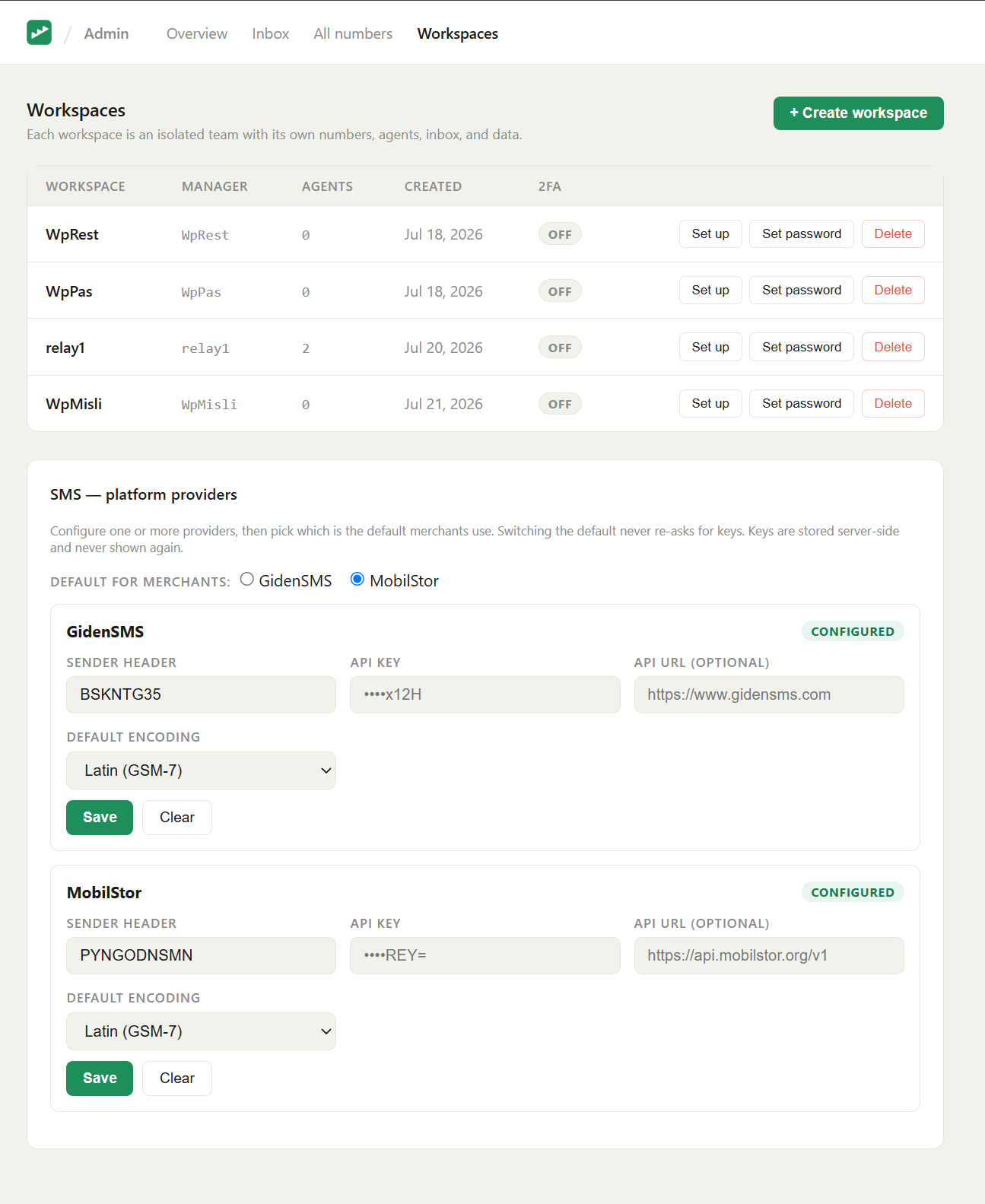
API keys are stored server-side and never shown again. A saved key displays only as a masked hint (e.g.
••••1234), and is never returned to the browser. Keep the originals somewhere safe.
How a workspace uses it
In its own SMS settings a workspace manager picks one of: system default (your chosen provider), a specific platform provider (your account, no key entered), or its own credentials. See the user guide → Sending SMS.
Backups
SMS provider credentials and send history live in inbox.db (inside ./data), so the
backup above already covers them — no extra step. Because the API keys are stored
there, treat the ./data backup as sensitive.